How to design your own journal and get it printed
Got a shelf of planners you only used for a few weeks? Plenty of us do. When you design your own journal, you pick every page that goes in it.
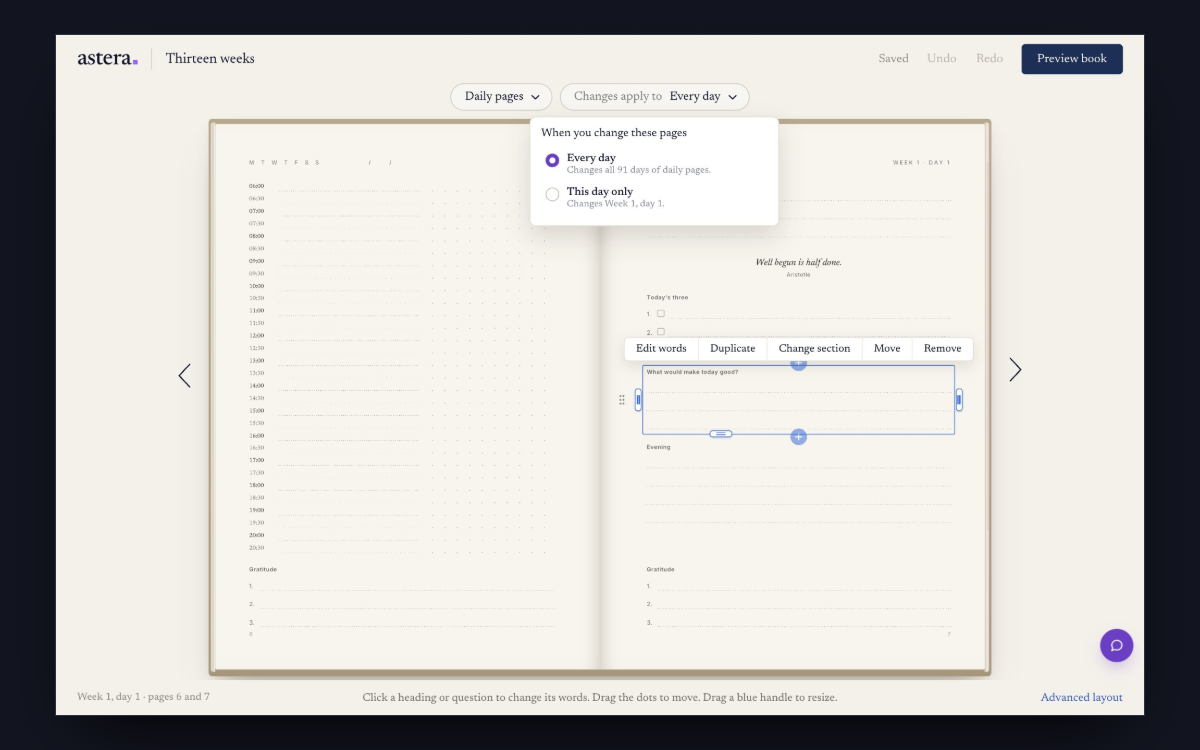
Make your journal in the editor
- Pick a journal to start fromOpen the templates and pick the one closest to how you like to write. You can take one layout from another template into yours as well.
- Make the coverChoose a softcover, a hardcover or linen, then type your title and pick a colour. On linen, the title is pressed into the cloth in gold or silver foil.
- Change the wordsClick or tap a heading or a question and type your own words. A change on a daily page goes on every day in the book. Want one day to be different, like your birthday? Pick This day only from the menu at the top, then make the change.
- Move things and add moreDrag the dots beside a section to move it up, down or onto the facing page. Pull a blue handle to give it more room. The + between sections adds a question, a quote, a schedule, a photo or a habit tracker. On a phone or tablet, tap a section and choose Add below. If a page is full, the editor shows you a way to make room, and nothing moves until you say so.
- Read it through, then orderPress Preview book and read your whole journal. When you’re happy with it, order from there. It’s printed and posted straight to you.
What to change first
Think about the last planner you stopped using. Was there a page you skipped every day, or a box that was always too small? Change those first.
If it’s your first journal, change very little. Keep a note of what you’d change for the next one.
To see other ways to plan a week, open the weekly plan and press Change layout. You can try each design on your own week and keep the one you like.
Ideas for your daily pages
Our list of what twelve best-selling journals put on a daily page shows the fields they use most. Borrow any you like.
Start your journal
Designing it is free. You pay when you order the printed book.
Create your journalQuestions
What size is the journal?
A5, which is 148 by 210 millimetres.
Do I need an account?
You don’t need one to design your journal. It’s saved in the browser on the device you’re using. When you order, you pop in your email and we save your journal to it.
Can I use my own photos?
Yes. Add a photo to any page, or add the Vision page at the front and arrange your photos on it. For a sharp print, use the largest copy of each photo you have.
Can I undo a change?
Yes. Undo and Redo sit at the top of the editor.